
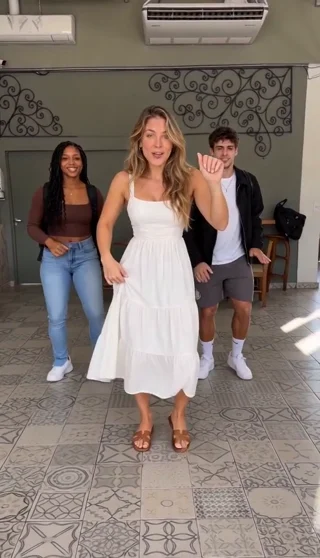
14-second full danceThis AI dance example was created from the three photos shown in the generator.
1. Choose one photo or three photos
Open the Calcanhar 2 Dance generator and select 1 photo or 3 photos in the upload area. One-photo mode uses one visual identity reference; three-photo mode provides a separate image for each of the three dancer slots. Two-photo sets are not supported.
Use one clear subject per image. You can upload JPG, PNG or WebP files up to 10 MB each. Keep each side between 300 and 6000 pixels, and avoid panoramas or very tall crops with a tiny face.
For trio mode, fill all three slots before generating. Check the thumbnails after uploading. Removing a photo reopens its slot; switching to one-photo mode keeps the first uploaded subject and removes the extra local previews.
2. Choose the video quality and format
The full dance is 14 seconds with sound. Standard 480p uses 100 credits; HD 720p uses 200 credits. The same rates apply whether you use one photo or three.
| Setting | Available choices |
|---|---|
| Photos | Exactly 1 or 3 |
| Full duration | 14 seconds |
| Standard | 480p · 100 credits |
| HD | 720p · 200 credits |
| Format | 9:16, 16:9 or 1:1 |
| Download | MP4 with sound |
Choose a frame that suits where you will post the video. Portrait gives the dancers more vertical space; landscape and square produce different framing. A higher-resolution video cannot restore facial detail missing from a blurry photo. Choose a clearer photo before generating if the original is blurry.
3. Generate, review and download
Sign in and review the displayed quote before starting. When generation is available, the prepared template provides the Passinho Charme scene, motion reference and soundtrack, so there is no custom prompt to write.
Eligible new accounts can try one free 4-second opening preview at 480p, subject to availability and network checks. It is an opening sample, not the full dance. A full video uses credits.
Open My creations to check the task, replay the result and download the MP4. Processing time depends on the provider queue. Check the existing task before submitting another request; generating again creates a new task and uses more credits. Reserved credits are returned when a task is confirmed as failed or canceled.
Use the demo as a format reference
The comparison player shows the supplied reference beside a real AI-generated result. The three portraits alongside it are the actual input photos for that result. Use the paired photos and video to see how each subject’s appearance transfers into the dance.
The AI can vary facial details, clothing, hands and footwork between renders. Clear photos and a consistent frame help, but they do not guarantee an exact result. Read what the Calcanhar 2 Dance trend is for the project’s inspiration and source attribution.
The same photo workflow is available on the Passinho Charme generator page. Check pricing for current credit packs and subscriptions.
Your dance video starts with one or three photos
Choose your dancers and make your own Calcanhar 2 Dance video.
Choose my dancer photos